
Module 1 — Foundations
RDF, Turtle, basic SPARQL. The conceptual core of the semantic web stack.
Weeks: 1-3 Effort: ~5-7 hours per week
The idea at the center of this module is old, but it keeps becoming newly useful. Whenever software starts to do more than store and display information — whenever it needs to search, connect, reason, retrieve, or act — the same problem returns: meaning has to be represented in a form machines can follow.
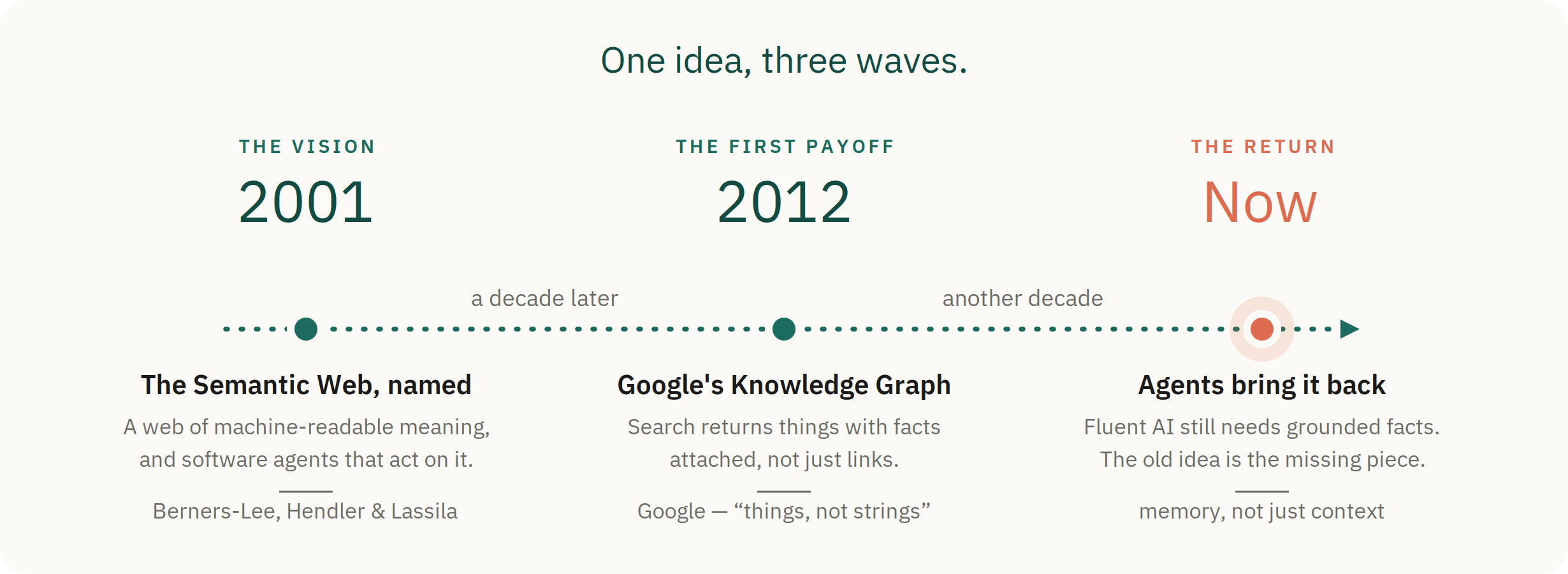
The names change from wave to wave, but the underlying move is the same. Instead of treating knowledge as loose text, we give software a structure it can traverse: one thing connected to another by a named relationship. That structure has a smallest unit — the triple.
A triple is small enough to seem almost trivial: a subject, a predicate, and an object. But that tiny shape is the atomic unit underneath RDF, Turtle, SPARQL, linked data, vocabularies, and knowledge graphs. It’s what lets meaning become something you can write down, connect, query, reuse, and trust across systems.
Module 1 starts there.
What you’ll come away with
- Read and write Turtle → write down any fact as a connection a machine can follow
- Run basic SPARQL → ask questions that follow chains across the data
- Query local plus Wikidata → borrow the world’s facts, not just your own
- Articulate RDF vs JSON vs property graphs → tell a client which shape their problem actually needs
By the end, you should be able to explain to a working engineer why someone would choose RDF over a labeled property graph (or vice versa) without resorting to slogans.
The three submodules
The module moves up the stack in order: the data model first (1.1), then the query language that runs over it (1.2), then the vocabularies that make it interoperable (1.3). The rhythm for the full path is the same each week: read the canon → read the synthesis → run the workbook → save the receipt.
| Submodule | Canonical reading | Synthesis material | Workbook | Receipt |
|---|---|---|---|---|
| 1.1 — RDF as a data model | Allemang Ch. 1–3 · W3C RDF Primer · Turtle spec (skim) | 1.1 RDF vs. LPG · reading companion | Naruto or mythology | Explain the URI tax; inspect or create a small Turtle graph |
| 1.2 — SPARQL basics | DuCharme Ch. 1–2 | 1.2 SPARQL query forms | Naruto or mythology · Wikidata orientation (Exercise 1.1) | Run SELECT, ASK, CONSTRUCT, DESCRIBE; save three query patterns |
| 1.3 — Vocabulary landscape | Hogan et al., sections 3–4 · optional Linked Data design note | 1.3 vocabulary landscape | Resume workbook | Build or adapt a resume RDF slice; run the ESCO/SKOS interop query |
The W3C Primer is surprisingly readable — don’t skip it just because it’s a spec. The Turtle spec is a reference; bookmark it and skim §1-3 for orientation.
Reference: keep the Module 1 cheat sheet open while you work. Terms are defined in the glossary, and the curriculum map shows how the pieces fit together. (All best viewed on the live site, curriculum.barbhs.com.)
Choose your dataset
The workbooks come in two narrative flavors plus the resume dataset. Pick one and stay with it — the RDF, Turtle, and SPARQL patterns are identical across all three.
- Naruto — choose this for continuity with the rest of the curriculum. The Naruto graph carries forward into Module 2 (ontology design), Module 3 (reification and provenance), and Module 4 (deployment).
- Greek mythology — the same patterns in a domain that may feel more familiar or less anime-specific. A fully supported alternate path, not a lesser version.
- Resume — the professional-data path, and the bridge into this module’s primary artifact: a resume graph slice with RDF, SKOS, and ESCO-style interoperability (Submodule 1.3).
How to work through it
Three ways in, depending on what you need.
If you want the concepts to land before you build — the suggested path:
- Keep the cheat sheet open and skim the submodule table above.
- For each submodule: do the canonical reading, read the synthesis page, run the workbook, save the receipt.
- Finish by building the Resume Graph Explorer RDF slice (Submodule 1.3).
- Take the 30-second test: explain when you’d choose RDF over a labeled property graph, and when not to.
If you need a runnable win before the theory lands:
- Start Fuseki and open the cheat sheet.
- Run the 1.1 workbook, then the 1.2 workbook (mythology variants linked in the table).
- Load
resume-001.ttland run the 1.3 resume workbook. - Then go back to the readings and synthesis pages to understand what you just built.
If you’re already fluent (or returning to this material):
- Read the 1.1 RDF vs. LPG synthesis.
- Run enough workbook queries to confirm your data-model intuitions.
- Build your own resume RDF slice and write the side-by-side query comparison (Cypher vs. SPARQL).
- Draft the end-of-module blog post or reflection.
Exercises
Exercise 1.1 — Wikidata orientation (1 hour)
Open the Wikidata Query Service and run these queries. Use the helper UI to find Q-numbers and modify example queries rather than starting from scratch.
- All books written by Adrian Tchaikovsky (find his Q-number via search)
- All people who studied at MIT and have a Wikipedia article
- All ESCO-classified occupations whose label contains “data scientist”
Notes go in notes/week-01-wikidata.md. Capture: which queries were intuitive, which were surprising, what tripped you up.
Exercise 1.2 — Hand-written FOAF graph (1 hour)
In a .ttl file, model yourself and three of your projects. Use:
foaf:Personfor the human- A custom namespace (e.g.
https://sensemaking-ai.com/ns/) for the projects schema:properties where they fit (schema:codeRepository,schema:dateCreated,schema:description)
Load into Fuseki. Write three SELECT queries that retrieve different cross-sections of the data. Commit the file as exercises/1-2-foaf-graph.ttl and the queries as exercises/1-2-queries/.
Exercise 1.3 — Resume Graph Explorer RDF slice (3-4 hours) — primary project
See Primary project hook below.
Exercise 1.4 — Naruto Graph Turtle slice (2-3 hours)
Take one arc from the Naruto Network Graph — Chunin Exams is the most self-contained — and convert ~20 character nodes plus their canonical relationships into Turtle.
Use:
schema:Person(or a subclass) for characters- Custom namespace for ninja-specific concepts (ranks, jutsu, villages)
schema:TVEpisodefor arc episodes
Load into Fuseki. Write three SPARQL queries that match queries already run in Neo4j on the same data. Compare query ergonomics — where does each language pull ahead?
Commit as exercises/1-4-naruto-slice/ with data.ttl, queries/*.rq, and a notes.md capturing the comparison.
Primary project hook: Resume Graph Explorer RDF slice
The Resume Graph anchors this module specifically because of ESCO/SKOS — that’s where RDF’s interoperability story has actual teeth and where the comparison with property graphs is sharpest.
Goal
Take a small but representative subset of the Resume Graph Explorer Neo4j data (one resume, ~30-50 nodes) and produce a parallel Turtle version with side-by-side queries.
Steps
- Pick one resume with rich structure (multiple jobs, education, ESCO-linked skills). Your own is fine.
- Export the relevant Neo4j subgraph as Cypher CREATE statements. Save to
artifacts/resume-graph/cypher/resume-001.cypher. - Hand-write the equivalent in Turtle as
artifacts/resume-graph/ttl/resume-001.ttl, reusing:foaf:Personfor the resume subjectschema:Organizationfor employersschema:DateTimefor datesskos:Conceptfor skills with ESCO concept IRIs- Custom
sensemaking:namespace for resume-specific structure
- Load both into their respective stores (Neo4j and Fuseki).
- Write the same three queries in both Cypher and SPARQL:
- All jobs in chronological order
- All skills associated with a job, with ESCO codes
- All transitions between consecutive jobs
What you’ll feel
Cypher will be more ergonomic for the chronological query — Neo4j was built for path traversal. SPARQL will surprise you on the ESCO query because SKOS is already RDF; your ESCO links are first-class triples instead of foreign keys you have to join through.
Pain points to surface
Sit with these tensions as you work through the module. Each shows up in the publishable blog post:
- Why four serializations for the same data? RDF/XML, N-Triples, Turtle, JSON-LD. Each exists because none is good enough for everything. You’ll use Turtle for almost everything.
- The URI tax. RDF is more verbose than Cypher because every term is globally identifiable. That precision pays off in some contexts (data integration, regulatory environments) and is pure overhead in others.
- Blank nodes. RDF allows unnamed nodes. They’re useful but break graph identity across systems. Two blank nodes from different sources can’t be reliably compared.
- Open-world assumption. “Not stated” doesn’t mean “false.” This is the hardest mental shift coming from SQL or property graphs. Module 3 deals with this in depth; start noticing it now.
Publishable deliverables
| Artifact | Where | Audience |
|---|---|---|
| Blog post: “LPG vs RDF for resume graphs: a side-by-side” | sensemaking-ai.com | Pragmatic engineers |
| Naruto Turtle slice committed publicly | this repo | Followers of the public learning |
| LinkedIn post linking to the blog | Broader network | |
| Two weekly progress LinkedIn updates | Network at large |
Synthesis notes
One paragraph per week, in your own words, capturing what landed and what didn’t. These become source material for the blog post and for the Digital Twin’s knowledge base.
notes/week-01.mdnotes/week-02.mdnotes/week-03.md
Activities checklist
Reading
- Allemang Ch 1-3
- W3C RDF 1.1 Primer
- W3C Turtle spec (skim)
- DuCharme Ch 1-2
Exercises
- 1.1 Wikidata orientation
- 1.2 FOAF graph
- 1.3 Resume Graph RDF slice (primary)
- 1.4 Naruto Graph Turtle slice
Notes
- Week 1
- Week 2
- Week 3
Deliverables
- Blog post drafted
- Blog post published
- LinkedIn post linking to blog
- Weekly LinkedIn updates × 2
- End-of-module reflection in
REFLECTIONS.md
When you’re done
This module opened with one claim: that under three waves of reinvention — the semantic web, the knowledge graph, the grounded agent — sits a single small unit, the triple. The test of whether that landed isn’t reciting the claim back.
It’s the 30-second test, out loud: explain to a working engineer why someone would choose RDF over a labeled property graph, and when they shouldn’t. If the answer is confident and concrete — specific examples, not abstractions — the foundations have landed. Move to Module 2.
If it feels vague, redo Exercise 1.3 before moving on. The side-by-side comparison is where the difference clicks, and rushing past it makes Module 2’s modeling work harder.